
Have you ever been mid-sentence on a video call when a sharp twinge in your lower back made you freeze? I’ve been there. One moment I was perfectly fine, leaning into my ergonomic office chair, and the next, I was clutching my pelvis in pain. That lightbulb moment hit me hard—I realized that despite investing in my office setup, I had overlooked one crucial aspect: how I adjust my lumbar support.
Today, I want to share with you the four lumbar support adjustments I’ve found most effective for 2026. These tweaks transformed my office experience, helping me avoid those disruptive pains and sit comfortably for hours. If you’ve ever felt that nagging discomfort after a long day at your desk, this post is for you.
Align Your Chair Height for Optimal Lumbar Support
Start by adjusting your chair height so that your feet rest flat on the floor, knees at a 90-degree angle, and hips slightly above your knees. This positioning reduces pelvic tilt and ensures your lumbar region is supported naturally. I recall a morning when I mistakenly kept my chair too high, causing my lower back to arch unnaturally; lowering it immediately relieved that strain.
Nail Down the Proper Lumbar Height and Depth
Set Lumbar Height Correctly
Locate the lumbar support adjustment lever—most ergonomic chairs have this, or use the built-in dial. The goal is to position the support so it cups the natural curve of your lower back, roughly at your waist level. A quick check: sit back and feel if the support presses into your lumbar curve without digging in or feeling loose. Adjust until it feels like a gentle hug, as in my trial of realigning support, which instantly alleviated ongoing soreness.
Adjust Seat Depth for Pelvic Comfort
Push your back fully into the lumbar support, then slide your seat forward or backward to ensure a two to three-finger space between the front edge of the seat and your knee. This prevents pressure on the thighs, promotes better circulation, and maintains lumbar support effectiveness. I learned this the hard way—sitting too deep caused my pelvis to tilt forward, negating lumbar support benefits.
Secure the Lumbar Support in Place
Once adjusted, test the support by leaning back and forth; it should hold firm without slipping. If it slides down or shifts, consider applying fix solutions like sticky pads or adjusting tension mechanisms, as explained in these tension hacks. In my experience, ensuring a snug fit prevents constant readjustment, saving time and maintaining good posture throughout the day.
Fine-Tune Your Armrests for Less Neck Strain
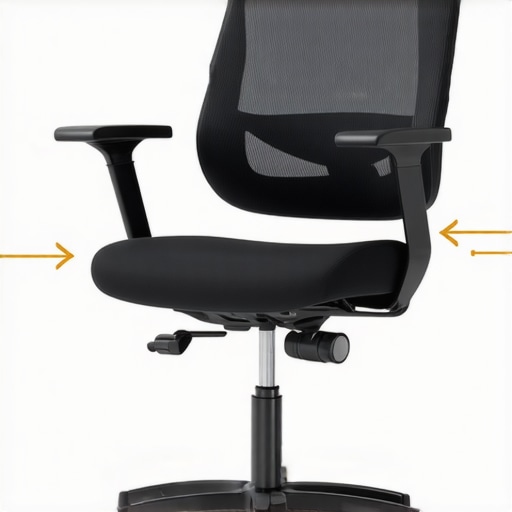
Proper armrest positioning takes the load off your shoulders, which indirectly benefits your lumbar health. Adjust them so your elbows are at a 90-degree angle and your shoulders relax. I once ignored this, resulting in neck tension; adjusting armrests to support my arms subtly reduced the upper-body fatigue, allowing better focus and less back tension.
Revisit These Settings Regularly
Your body and work habits change over time, making it essential to periodically revisit your chair adjustments. Set a reminder weekly to reassess lumbar support height and depth. This habit keeps your posture aligned and reduces the risk of discomfort or injury, just like it did for me after a long stint of priming my support settings, which made a surprising difference in daily comfort.
While many believe that mesh chairs automatically guarantee superior comfort and support, the reality is far more nuanced. One prevalent misconception is that all mesh is equally breathable and durable; in truth, the quality of mesh material varies significantly, impacting long-term comfort and the chair’s resilience. For example, cheaper mesh fabrics tend to sag or wear out within months, compromising lumbar support and leading to lower back pain, as noted in studies highlighting the importance of high-quality mesh in ergonomic design (source: 7 Mesh Chairs Built to Last). Moreover, many assume that adjustable lumbar support is always effective; however, if not set correctly, it can cause more harm than good, pressing into the lumbar spine at the wrong height or depth, which can exacerbate discomfort over time. This is why understanding the nuances of lumbar support adjustment and regularly revisiting your settings is critical, as discussed in Lumbar Support Optimization. Another common trap involves relying solely on the chair’s features without considering proper positioning; a high-quality ergonomic chair is only as effective as the user’s ability to adjust it correctly. For instance, setting your seat depth to avoid pelvic tilt is essential, yet many overlook this detail, leading to support misalignment and pain. Remember, advanced users often customize armrest height and tilt simultaneously, which can significantly reduce shoulder and neck strain, indirectly benefiting lumbar health. Don’t fall into the trap of thinking that a one-size-fits-all approach works for office seating; each person’s body and work habits are unique, necessitating tailored adjustments. Have you ever fallen into this trap? Let me know in the comments and share your experience.
Investing in Quality Maintenance Tools
To ensure your ergonomic office chair remains supportive and comfortable over the years, having the right tools is crucial. I personally rely on a set of precision screwdrivers and a small torque wrench, which allow me to tighten loose components and prevent issues like sinking gas lifts or slipping armrests. A reliable set of these tools, such as the Wiha Precision Screwdriver Set, enables quick at-home adjustments without damaging delicate parts. Additionally, a can of compressed air ensures that dust doesn’t accumulate in mechanisms, preserving smooth operation. For high-end chairs, I recommend having a tension gauge to fine-tune tilt tension, aligning with expert advice from Lumbar Support Optimization.
Routine Checks for Long-Term Comfort
Regularly inspecting your chair can catch small problems before they become costly repairs. I suggest scheduling monthly maintenance where you check for any loosened bolts, worn-out casters, or sagging mesh fabric. Quick fixes—like replacing worn casters with high-quality, self-lubricating ones—can dramatically improve mobility and stability. When you notice your lumbar support shifting or losing firmness, refer to detailed guides like Sagging Mesh Support Fixes for step-by-step instructions. The key is consistency; a simple routine ensures your supportive features remain effective and your posture stays aligned.
Tools That Support Smart Adjustments
Modern ergonomic chairs often come with built-in adjustment mechanisms, but maintaining their functionality involves more than just initial setup. Using a digital level app on your smartphone can help verify that your seat height and armrest positions stay within optimal ranges, preventing strain over time. For instance, a study in the Ultimate Guide to Lumbar Support highlights how precise adjustments can prevent long-term pain. I personally calibrate my chair every six months, using these apps to ensure my settings haven’t subtly shifted. Incorporating these tools into your routine can prolong the lifespan of your investments and safeguard your health.
Predicting Future Trends in Office Seating Maintenance
As smart technology continues to evolve, I forecast future office chairs will integrate sensors that monitor usage patterns and automatically alert you to necessary maintenance tasks. Imagine a chair that detects loosened bolts or sagging fabric and prompts you with app notifications—similar to the advanced diagnostics in modern cars. This trend toward proactive maintenance will help users avoid downtime and ensure consistent ergonomic support. To stay ahead, I recommend adopting modular seats with replaceable components, a practice already gaining popularity in professional office furniture, as detailed in Mesh Chairs Built to Last.
How Do I Keep My Office Chair Working? Find Out Now!
Take the time today to try out a tension gauge or schedule your next monthly inspection—these small steps can extend your chair’s life and improve your daily comfort. Remember, a well-maintained chair isn’t just about longevity; it’s about maintaining your health and productivity. For tailored advice or to discuss your specific setup, don’t hesitate to reach out.
The Hidden Pitfalls of Assuming One-Size-Fits-All
One of the most surprising lessons I learned was the danger of trusting generic settings or assumed standards when it comes to ergonomic support. Early on, I thought that simply adjusting my mesh chair’s lumbar support to the middle position was enough, but I soon realized that each body is unique, and uniform solutions rarely fit all. Personalization is key—whether it’s tuning lumbar height or armrest positioning—to truly benefit from your office seating investments.
How Subtle Shifts Bring Big Relief
Small tweaks in seat depth or cushion firmness can significantly decrease symptoms of lower back discomfort. I discovered through trial and error that even minor adjustments, like tilting my seat forward by a few degrees or altering the tension in my mesh support, made my long workdays much more comfortable. These tiny changes often go unnoticed but have the power to transform your sitting experience from painful to pleasant.
Not All Mesh Is Created Equal—Choose Wisely
I fell into the trap of buying a popular mesh chair, expecting durability and breathability, only to find it sagged within months. My mistake taught me the importance of investing in high-quality mesh fabric, which maintains its form and support over time, preventing back pain and discomfort. Knowing what to look for—like reinforced edges and dense weave—can save you from frustration and constant replacements.
Your Support System Should Be Dynamic
Supporting your back isn’t a set-and-forget task. Regularly revisiting your chair adjustments—armrest height, lumbar support depth, seat angle—is essential as your posture and workload evolve. Setting monthly reminders helps keep your ergonomic setup aligned, ensuring consistent comfort and preventing the buildup of strain. I found that this habit turned into a routine that upheld my health and productivity.
Investing in Proper Tools Elevates Support
Having the right tools, like a tension gauge or adjustable wrenches, allows me to fine-tune my office seating with precision. These tools help maintain optimal tension in tilt mechanisms or tighten loose components, ensuring longevity and sustained performance. Personally, I rely on trusted brands like Wiha for their reliability, which underscores the importance of quality tools in upholding ergonomic standards.
Curated Resources That Really Help
For in-depth guidance beyond this post, I turn to comprehensive resources like the Ultimate Guide to Ergonomic Chairs. It offers detailed insights into personalized adjustments and chair quality aspects. Additionally, I keep a close eye on expert reviews from sites like Mesh Chairs vs. Traditional Seating to stay ahead of the latest developments. These trusted sources enhance my understanding and support better decision-making.
Embrace Change and Prioritize Your Comfort
Remember, improving your ergonomic setup is a journey, not a one-time fix. Small, consistent adjustments and a willingness to explore better support options can vastly improve your daily well-being. Your office seating isn’t just furniture; it’s an investment in your health and productivity. So, take a moment today to evaluate your support system, experiment with minor tweaks, and enjoy the benefits of a pain-free, focused workday.
![3 Telltale Signs Your Lumbar Support Is Set Wrong [2026]](https://chairs.techdeskessentials.com/wp-content/uploads/2026/02/3-Telltale-Signs-Your-Lumbar-Support-Is-Set-Wrong-2026.jpeg)