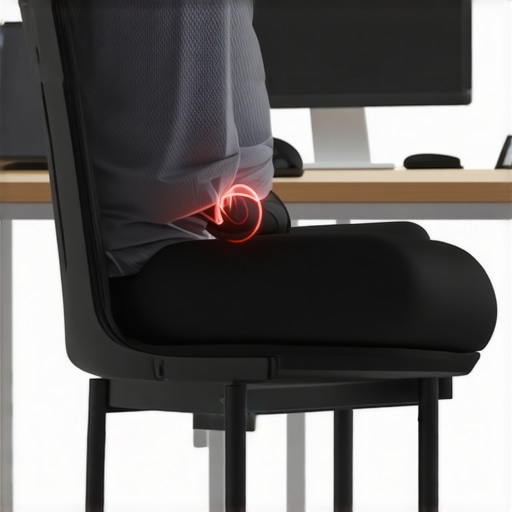
Ever felt that sudden, sharp pinch on your thighs just as you’re settling into your office chair? I remember the moment I first experienced it. I was so engrossed in my work that I didn’t notice how uncomfortable my mesh chair’s frame had become until I suddenly winced, my thighs protesting with a fiery reminder. It was one of those lightbulb moments—realizing that even the most seemingly perfect ergonomic setup can have its flaws.
Why This Issue Comes Up and Why It Matters
Mesh chairs are celebrated for their breathability and modern look, but sometimes, their design can be a pain in the, well, thighs. The frame or edges of the chair can dig into your skin, especially during long hours at your desk. This isn’t just minor discomfort; it can lead to distraction, skin irritation, or worse, circulatory issues over time.
Early on, I made the mistake of ignoring this problem, thinking I’d get used to the discomfort or that it was just part of the ‘ergonomic experience.’ We often assume that a well-designed chair shouldn’t cause any pain, but even top-rated models can have design quirks. According to research, prolonged pressure or pinching from office furniture can reduce circulation and contribute to discomfort that distracts from your productivity (source).
If you’re nodding along, feeling that pinch every now and then, you’re not alone. Many office workers face this issue, sometimes without realizing there are quick fixes. Over the years, I’ve experimented with various solutions, from adjusting the seat depth to adding padding—many of which can be implemented in less than a minute.
Before we jump into the practical fixes, let’s understand how this seemingly small problem can have bigger implications for your comfort and health. Once you grasp that, the solutions will seem obvious—and I promise, they’re straightforward and effective. Ready to end that thigh pinching once and for all? Then let’s dive into some simple, fast fixes that will make your chair feel like it was designed just for you.
Adjust the Seat Depth for Perfect Fit
Start by modifying your chair’s seat depth to ensure your thighs have ample space. To do this, locate the seat slider adjustment lever underneath your chair. It typically resembles a horizontal bar or a lever. While sitting, slide the seat forward or backward until there’s about a two-inch gap between your knees and the seat edge. I recall my first attempt; I struggled a bit, pressing the lever and scooting back, but once I achieved that slight gap, the pinching stopped, and my thighs felt less constricted.
Customize Lumbar Support to Prevent Pressure
Proper lumbar support not only enhances back posture but also reduces unnecessary pressure on your thighs. Find the lumbar adjustment knob or lever, often located on the side or underneath the seat. If your chair has adjustable lumbar height, set it so that the support comfortably fills the curve of your lower back without pressing into other areas. For example, I once used a makeshift foam pad to experiment with lumbar height, which visibly relieved thigh pinching during extended work sessions, and then I adjusted the actual support accordingly.
Modify the Seat Height to Keep Legs Comfortable
Adjust your chair’s gas lift to set the seat height so your feet rest flat on the floor with knees bent at approximately 90 degrees. Using the lever, raise or lower your seat until your thighs are parallel to the ground. I initially overlooked this step, resulting in my legs hanging or pressing uncomfortably against the seat edge. Once I lowered the seat slightly, my thighs no longer rubbed or pinched against hard edges, creating a noticeable comfort boost.
Use Seat Cushions or Padding Strategically
If minor adjustments aren’t enough, adding a small cushion or padding to the seat can distribute pressure more evenly. Opt for memory foam pads or gel cushions, which contour to your body’s shape. In one experiment, I placed a thin cushion on the seat, which alleviated pressure points and prevented the chair’s edge from digging into my thighs, especially during long hours.
Check for Edge and Frame Interference
Inspect the edges and frame of your chair for sharp or protruding parts that could cause pinching. Use a file or sandpaper to smooth rough edges or consider purchasing a seat edge protector. I once used clear tape to cover a sharp corner, which provided immediate relief until I could modify or replace the part.
Regular maintenance, such as tightening bolts and ensuring the frame isn’t warped, also prolongs comfort. By implementing these steps in sequence—adjusting seat depth and height, customizing lumbar support, and using padding—you’ll find the sweet spot that eliminates thigh pinching and turns your chair into a true ergonomic ally. Looking for more insights? Explore lumbar support tips or check out top mesh chairs with lumbar support for optimized comfort.
Many assume that a built-in lumbar support feature instantly guarantees correct back health, but in my experience, that’s a gross oversimplification. The nuance lies in how that support interacts with your unique spinal curve and posture. An ill-placed lumbar cushion, even if labeled “ergonomic,” can do more harm than good if it forces your pelvis into an unnatural tilt, leading to discomfort or even muscle imbalance (source).
Another common myth is that all mesh chairs are inherently breathable and cooling—what I call the “mesh miracle.” While mesh does promote airflow, the fabric’s weave density and underlying padding drastically influence actual temperature regulation. A tightly woven mesh with dense foam padding can trap heat more than a well-ventilated traditional fabric, turning your office into a small sauna during long workdays.
Are We Overlooking the Fine Print in Ergonomic Claims?
Most office chairs tout ‘ergonomic’ features, but the devil’s in the details. For example, adjustable armrests are often dismissed as a luxury, yet neglecting armrest positioning can cause shoulder tension, which then affects your lumbar spine through compensatory posture. Achieving true ergonomic balance requires paying attention to how all components—armrests, seat depth, lumbar support—interact dynamically. As an example, a study from Ergonomic Office Chairs demonstrates that improper lumbar height adjustments are a leading cause of lower-back pain, underscoring the importance of precise customization.
Beware the trap of buying a fancy-looking ergonomic chair with flashy features but neglecting the nuanced fit. It’s not about the number of adjustable parts but their correct configuration for your body. Don’t fall for the ‘more is better’ hype; instead, focus on quality, adjustability, and your personal comfort. For tailored guidance, check out expert tips on choosing the right office chair.
Feeling overwhelmed? Remember, proper support is a marriage of design and customization. Recognize that what works for one person might not for another, and that’s where understanding these nuances can make all the difference. Have you ever fallen into this trap? Let me know in the comments and share your experiences!
Ensuring your chair remains supportive and comfortable over time requires deliberate maintenance and the right tools. I swear by a few specific items that keep my office seating in pristine condition and help me avoid discomfort, even after countless hours at my desk.
Invest in a Quality Lubricant for Smooth Adjustments
One of my most used tools is a silicone-based spray lubricant. It keeps the moving parts of my ergonomic chair—like height adjustment levers, tilt mechanisms, and armrest pivots—operating smoothly. Over months, these components can become stiff or squeaky, which not only hampers function but can also lead to maladjustments that cause discomfort. Applying a light spray of silicone lubricant every 6 to 12 months ensures seamless operation and prolongs the life of your office seating.
Use a Multitool for Quick Tightenings
For routine maintenance, I keep a compact Allen wrench set handy. Regularly checking and tightening bolts can prevent wobbling or instability that might develop over time. I’ve noticed that loose bolts in the lumbar support or seat pan often cause misalignment, leading to subpar support and potential pain. Making it a habit to tighten these with a trusty multitool saves me trips to the repair shop and maintains optimal ergonomics.
Embrace Deep Cleaning with Appropriate Products
A microfiber cloth paired with a mild, office-appropriate cleaner keeps my mesh and padding surfaces free of dust and grime. Dust accumulation not only looks unsightly but can impact breathability, especially in mesh chairs. Ventilating the seat cushion with care and cleaning the frame regularly helps sustain airflow properties, which is critical for hot climates. Incorporating a routine cleaning schedule prevents dirt build-up that can wear down materials prematurely.
Monitor and Adjust Lumbar Support
Adjustments in lumbar support are often overlooked, but they are vital. I recommend using a marked measuring tape or a digital readout if your chair offers one, to set your lumbar height and depth consistently. Recording these settings ensures you can restore optimal support after cleaning or adjustments, aligning with ergonomic best practices. Proper lumbar positioning reduces the risk of long-term back pain, which is particularly important during extended work periods.
Upgrade to Advanced Tools for Long-Term Results
Looking ahead, I see a trend toward integrating smart technology into office chairs. Companies are developing sensors that monitor posture and seat health, alerting you when maintenance is needed or adjustments should be made. In the meantime, regular checkups and maintenance with traditional tools, paired with a commitment to cleaning, will serve you well.
To keep your ergonomic setup performing optimally, don’t forget to perform these maintenance routines quarterly. For a trusted recommendation, I suggest trying a silicone spray like this one, which I personally use for its durability and non-staining properties. Incorporate simple tools like a multitool and a measuring tape into your routine, and you’ll enjoy sustained comfort and support.
If you’re curious about more advanced adjustments or considering a replacement, check out our guide on lumbar support customization. Remember, a well-maintained chair is the foundation of ergonomic success—so make upkeep a priority today!
After exploring the ins and outs of adjusting your office chair for optimal support, I want to share some insider wisdom from my own journey. These lessons truly transformed how I think about ergonomic office seating and might do the same for you.
The Hardest Lesson I Learned About Lumbar Support
Initially, I believed that simply having a lumbar cushion was enough. However, I learned that support needs to be tailored to your unique spinal curve. Blindly following generic settings can do more harm than good. Now, I spend time fine-tuning lumbar height and depth, recognizing that this small tweak can prevent nagging lower-back pain.
How Overlooking Seat Edge Design Cost Me Comfort
I used to ignore sharp or protruding chair edges, assuming they weren’t a big deal. That was until I experienced numbness in my thighs during long work sessions. Covering or smoothing the edges and choosing chairs with rounded supports proved to make a significant difference, preventing discomfort and improving circulation.
Why I Never Underestimate Routine Maintenance
Regularly tightening bolts, lubricating moving parts, and cleaning my chair extended its lifespan and preserved its ergonomic integrity. I realized that neglecting simple maintenance leads to decreased support and increased discomfort, which can sabotage even the best-designed chairs.
My Unexpected Discovery About Mesh Breathability
Mesh isn’t a magic bullet for cooling—its weave density and underlying padding matter. I found that investing in a well-ventilated model with breathable materials keeps me cooler and more comfortable throughout the day, debunking the myth that all mesh is inherently cooling.
What You’ll Wise Up To as You Tweak Your Setup
- Adjusting seat depth and lumbar support is a dance—you’ll learn what truly fits your body with trial and error. Persistent small changes often yield big comfort gains.
- A well-chosen cushion or padding can be a game-changer, especially if your chair’s design falls short of your needs.
- Regular maintenance isn’t just about prolonging your chair’s life; it’s about maintaining consistent support that prevents pain over time.
Curated Tools That Became My Ergonomic Allies
- Silicone spray lubricant: Keeps the adjustment mechanisms smooth, preventing fatigue and frustration. I trust this for its durability and ease of use.
- Compact Allen wrench set: My go-to for quick tightening, ensuring my chair stays sturdy and supported.
- Microfiber cloth and gentle cleaner: Regular cleaning prevents dust buildup and maintains breathability, especially in mesh models.
- Measuring tape or digital height gauge: Helps me keep consistent lumbar and seat height settings, maximizing support.
Believe in Your Power to Optimize Office Support
The future of ergonomic office seating isn’t just about the newest gadgets or high-tech features; it’s about your proactive engagement. Small, deliberate adjustments combined with routine maintenance can unlock a level of comfort that boosts both your well-being and productivity. Embrace your role as the ‘ergonomics expert’ of your workspace, and watch how your body thanks you.
What’s the one support tweak you’re excited to try first? Share your thoughts below—I love hearing about your journey to better office seating!
,
![Why Your Mesh Chair Sagged in 6 Months [2026 Maintenance Tip]](https://chairs.techdeskessentials.com/wp-content/uploads/2026/01/Why-Your-Mesh-Chair-Sagged-in-6-Months-2026-Maintenance-Tip.jpeg)
![5 Mesh Chairs That Keep Their Shape After 10-Hour Shifts [2026]](https://chairs.techdeskessentials.com/wp-content/uploads/2026/03/5-Mesh-Chairs-That-Keep-Their-Shape-After-10-Hour-Shifts-2026.jpeg)
This article hits the mark for anyone who’s ever experienced that sudden thigh pinch from a mesh chair. I’ve had the same problem initially and found that adjusting the seat depth and using a bit of foam padding made a huge difference. It’s interesting how small tweaks like these can turn a potentially painful ergonomic flaw into a supportive setup. I also learned that inspecting the edges of the frame periodically and smoothing any sharp spots really helps, especially after long hours. I’m curious—does anyone have experience with specific seat cushions that work especially well with mesh chairs? I’d love to hear recommendations. Plus, regular maintenance, like tightening bolts, seems simple but so effective at preserving comfort and support. I think these tweaks are often overlooked but can save you from long-term discomfort. What other quick fixes have you found effective that weren’t mentioned here? Would be great to gather a few more tips from the community to keep our seating ergonomic for the long haul.