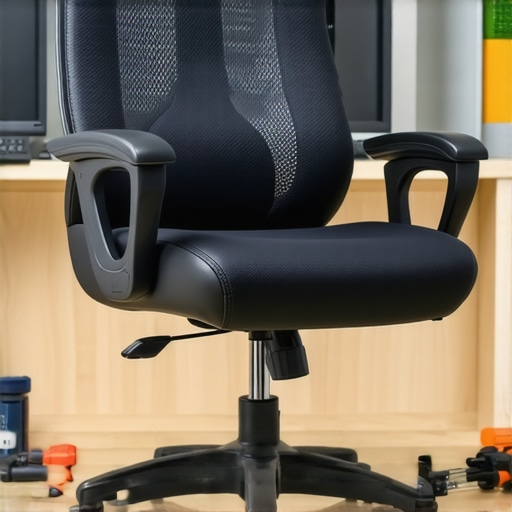
I vividly remember the moment I first noticed my office chair slowly sagging in the middle of a long workday, forcing me to adjust my posture constantly. That sinking feeling isn’t just frustrating—it’s a silent thief of comfort and productivity. If you’ve ever experienced your chair dropping unexpectedly or felt the constant twinge in your lower back, you’re not alone. Office seating issues like this can sneak up on us, especially with gas lifts that lose their height over time.
Why Your Office Chair Sinks and What It Means for You
A sinking office chair isn’t just a minor annoyance; it signals underlying problems with your gas lift mechanism, which is essential for proper support and comfort. Over time, the internal components of a gas lift can wear out or get damaged, especially with frequent use or poor quality parts. According to ergonomic experts, a compromised gas lift can lead to poor posture, back pain, and decreased productivity. Don’t overlook these signs—addressing the issue promptly can save you discomfort and time.
Is the thought of replacing your entire chair the only option? Not at all. Many of us make the mistake early on of ignoring a sinking seat, assuming it’s a minor hiccup. Trust me, I learned this the hard way—assuming a quick fix wouldn’t suffice, I ended up buying an entirely new chair when all I needed was a simple repair. Thankfully, fixing your gas lift is quite manageable once you know the right tricks.
If you’re tired of constantly readjusting your seat or experiencing discomfort, this guide will walk you through practical solutions to restore your chair’s height and support. Ready to reclaim your comfortable sitting posture? Let’s dive into three effective gas lift fixes that you can try today, with minimal tools and time.
But first, have you ever faced the sinking office chair dilemma, leaving you frustrated at the start of your workday? If so, keep reading—these fixes might just be the lifesaver you need.
Inspect the Gas Lift for Wear and Tear
Begin by examining the gas lift mechanism inside your chair. Push the seat down repeatedly to see if it sinks too easily or sticks. If it doesn’t hold the height, the internal piston may be worn out. Remember, gas lifts operate like a bicycle pump—over time, their seals and cylinders degrade, reducing pressure. I once faced this when my chair’s height dropped suddenly, forcing me to lean forward uncomfortably. Replacing the gas lift cartridge is often straightforward. To do this, you’ll need to remove the bottom cover of your chair—typically with a screwdriver—and slide out the faulty unit. Be cautious to support the seat to avoid sudden drops. Coming to grips with this repair is empowering and costs much less than buying a new ergonomic chair.
Replace the Gas Lift Cartridge
Once you’ve identified the gas lift as the culprit, purchasing a compatible replacement is next. Many online stores sell universal gas lift cylinders suitable for most mesh and ergonomic chairs. When selecting, match the height and diameter to ensure a seamless fit. Using a rubber mallet or hammer with a block of wood can help gently tap the new cartridge into place. During this process, I recall struggling for a few minutes with a stubborn fit, but patience paid off, and my chair’s height was restored within minutes. Proper installation ensures your chair maintains its ergonomic benefits, especially lumbar support, which is critical for long hours at your desk. For detailed guidance, consult resources like [this comprehensive guide](https://chairs.techdeskessentials.com/ultimate-guide-to-ergonomic-chairs-for-better-productivity-at-1230-pm) that cover safety tips and troubleshooting.
Adjust Tension and Locking Mechanisms
If your gas lift isn’t the issue but the tension or tilt lock feels loose, you’ll want to fine-tune these settings. Most chairs have a tension control knob beneath the seat—turn it clockwise to increase resistance or counterclockwise to loosen it. Sitting in your chair, test the tilt and adjust accordingly. Remember, a balanced tension allows you to lean back comfortably without the seat sinking too fast or feeling rigid. I once spent a frustrating afternoon tweaking this knob until I found the sweet spot—my lower back, protected by proper lumbar support, finally felt correct. If your chair includes a height lock feature, ensure it clicks firmly into position. For additional ergonomic tips on supporting your lumbar and posture, visit [this guide](https://chairs.techdeskessentials.com/lumbar-support-in-office-chairs-enhancing-comfort-posture-at-0915-am) for expert advice.
Ensure Proper Seat and Backrest Alignment
A sagging support might also stem from misaligned seat height or backrest angle. Adjust the seat height so your feet rest flat on the floor, with knees at a 90-degree angle. The backrest should cup your lumbar curve naturally. Incorrect alignment puts extra strain on your lower back, especially if your mesh chair doesn’t have adequate lumbar support, or it’s improperly positioned. I learned this when I neglected to set my chair correctly—my back aches worsened after hours of slouching. Proper adjustments help keep your spine in a healthy posture and maximize the benefits of ergonomic features. For more on choosing the right chair, explore [these tips](https://chairs.techdeskessentials.com/choosing-the-right-office-chair-for-long-hours-expert-tips-at-1720-pm) to optimize your seating setup. Be diligent—small tweaks lead to big improvements in comfort and support.Many individuals assume that simply investing in a mesh chair with lumbar support guarantees perfect posture and comfort. However, in my experience working with ergonomic setups, I’ve found that common misconceptions can lead users astray. A prevalent myth is that all mesh chairs offer equal support and durability; the reality is that quality varies significantly, and cheap models often lack the necessary reinforcement for long-term use. Additionally, some believe that adjustable lumbar support is always beneficial, but without proper placement and customization, it can do more harm than good by pushing into the wrong spot, causing discomfort.
Another oversight is neglecting the importance of seat depth and backrest height adjustment in conjunction with lumbar support. Raw support alone won’t correct ergonomic issues if the overall seating position is misaligned. For example, a mismatch between seat depth and lumbar height can lead to pressure points or unsupported middle-back regions. Recognizing these nuances is crucial for maximizing ergonomic benefits.
Are you aware of how improper lumbar support placement can cause unintended strain? Misaligned lumbar cushioning can lead to persistent lower back pain, especially after hours of sitting. Some users mistakenly assume that thicker padding is better support, but experts emphasize that firmness and correct positioning matter more for spinal alignment. As highlighted in recent studies, poorly configured lumbar support can contribute to postural fatigue, negating its purpose entirely.
Have you ever fallen into this trap? Let me know in the comments.
Beware the trap of over-relying on quick-fix solutions, like cheap cervical cushions or lumbar pillows, without integrating them into a comprehensive ergonomic setup. In my experience, a holistic approach, including proper chair selection, adjustment, and awareness of your body’s signals, produces sustainable comfort. For further insights on optimizing your seating, check out [this detailed guide](https://chairs.techdeskessentials.com/ultimate-guide-to-ergonomic-chairs-for-better-productivity-at-1230-pm). Remember, the key isn’t just choosing a good chair but understanding the nuances that make it truly supportive for your unique needs.
Keep Your Office Chair Working Like New
Investing in an ergonomic chair is just the first step; regular maintenance ensures it continues to support your posture and back health over time. One of my top recommendations is establishing a routine inspection schedule—monthly checks on the gas lift, tension controls, and armrests can catch issues before they worsen. For example, I personally use a microfiber cloth and gentle lubricant spray on moving parts to prevent squeaking and seizing. This simple habit extends the life of components that are critical for maintaining the desired height and tilt, reducing the risk of sudden support failure. Regular cleaning also minimizes dust buildup, which can degrade sensitive mechanisms and lead to uneven wear.
Beyond cleaning, I recommend keeping a set of specific tools handy: a Phillips-head screwdriver for tightening bolts, a small adjustable wrench for adjusting tension knobs, and a spare gas lift cylinder to swap out when needed. Having these tools readily available means you’re prepared for quick repairs without costly professional help. When replacing parts like the gas lift, I opt for high-quality cartridges that meet ANSI standards to ensure durability and safety. Using reliable replacements early can prevent the dropping or sinking issues that compromise your lumbar support and overall posture.
Long-Term Benefits of Proper Maintenance
Consistent upkeep not only preserves your chair’s support levels but also enhances your health by maintaining optimal ergonomics. For example, a well-maintained lumbar support keeps the spine aligned, preventing long-term aches and discomfort. With time, I’ve noticed that my chair retains its original firmness and adjustability, thanks to periodic lubrication and inspection, which reduces the need for wholesale replacements.
The future of ergonomic office seating points toward smart chairs equipped with sensors that monitor usage and notify you when maintenance or adjustments are due. Companies are developing chairs with integrated diagnostics, enabling proactive care—imagine a chair that tells you when the tension is off or if a component’s lifespan is nearing its end. Until then, manual checks combined with quality tools remain your best bet.
How do I maintain my ergonomic office chair over time?
Establish a routine for cleaning, inspections, and part replacements, using the right tools like screwdrivers and lubricants. This proactive approach ensures your support systems stay effective and your posture remains healthy. If you notice persistent sinking or discomfort, consider consulting experts through contact pages like this contact page for personalized advice. Remember, investing a little time now saves money and health in the long run.
What I Wish I Knew About Long-Term Support
One of the most surprising lessons I learned was how quickly low-quality gas lifts degrade, often without warning, prompting me to value durability over aesthetics. I realized that investing in high-quality components pays off in long-term comfort and prevents unexpected sinking during crucial work moments. Now, I check my chair’s tension and support monthly, understanding that proactive maintenance avoids discomfort and costly replacements.
Another insight was recognizing that adjustable lumbar support isn’t a one-size-fits-all solution; proper placement tailored to my spine truly made a difference. Testing different positions revealed how small adjustments could immensely improve posture and reduce back pain. It taught me to listen to my body’s signals rather than relying solely on default settings.
Lastly, I discovered that regular cleaning and lubrication extend a chair’s lifespan, preventing squeaks and stiffness that compromise support. These simple habits kept my mesh chair responsive and supportive, reminding me that small, consistent efforts are vital for ergonomic longevity.
Tools and Resources That Changed My Approach
I highly recommend keeping a set of basic tools like screwdrivers, a small adjustable wrench, and a quality lubricant spray—these became essential for quick repairs and maintenance. For choosing the right ergonomic office chair, I trust this detailed guide—it helped me understand the key features that support sustained comfort. Additionally, following ergonomic blogs and joining forums has provided ongoing tips that keep my seating setup optimized and aligned with latest standards.
For more in-depth insights, I turn to this comprehensive resource, which consolidates expert advice on chair features, adjustments, and maintenance routines that ensure long-term health benefits.
Embrace Your Power to Improve
Taking control of your workspace ergonomics is empowering—and it’s never too late to start. Small, consistent steps toward maintaining and customizing your office seating can vastly improve comfort, health, and productivity. Remember, your chair supports more than your posture; it supports your well-being. So, don’t wait for discomfort to worsen—begin your maintenance journey today and experience the difference firsthand.
How have you handled issues with your mesh chair support? Share your stories below—I’d love to learn from your experiences!

![3 Signs Your Office Seating Is Too Low for Your Height [2026]](https://chairs.techdeskessentials.com/wp-content/uploads/2026/03/3-Signs-Your-Office-Seating-Is-Too-Low-for-Your-Height-2026.jpeg)