
It hit me one dull Tuesday afternoon. I was hunched over my desk, suffering through yet another episode of lower back pain, feeling like I’d been run over by a truck. That familiar ache, the stiffness, the nagging discomfort—that’s when I realized: my office setup was slowly destroying my back, piece by piece. And if you’re like me, spending hours glued to your desk, you probably know that back pain isn’t just a minor inconvenience; it’s a real barrier to productivity and well-being.
Why Choosing the Right Lumbar Support Mesh Office Chair Matters
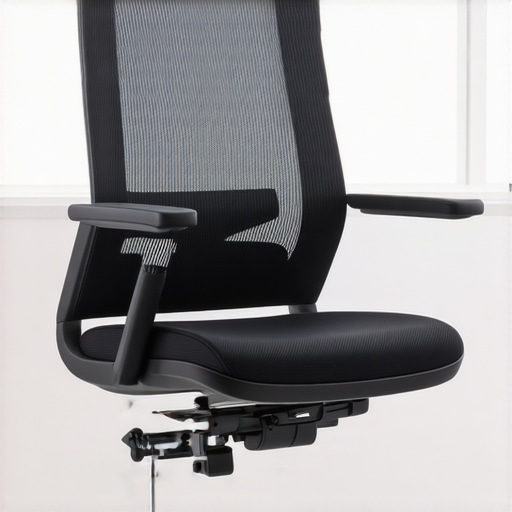
In my search for relief, I discovered that not all chairs are created equal. The secret lies in proper lumbar support—something many overlook or underestimate. I used to think that a decent desk chair was enough, but I learned the hard way that the wrong one can lead to chronic pain and posture issues. After trying countless options, I finally found that a mesh office chair with **adequate lumbar support** can make all the difference. Believe me, your back will thank you. Today, I’ll share how selecting the right mesh office chair with ergonomic lumbar support changed my daily experience, and how it can do the same for you. If you’ve ever faced persistent back discomfort, stay tuned. This guide is for you, and it might just be the game-changer you need. According to the Mayo Clinic, poor posture and inadequate lumbar support can lead to long-term back problems, emphasizing the importance of ergonomic seating for healthy living.
Adjusting Your Chair Height for Natural Alignment
Start by setting your chair height so that your feet rest flat on the ground, with knees bent at a 90-degree angle. Ensure your hips are level with your knees, preventing unnecessary strain on your lower back. I remember the first time I adjusted mine; I was surprised at how immediately my back felt better, reducing the pressure on my lumbar region.
Positioning the Lumbar Support Correctly
Most mesh chairs have adjustable lumbar support—use this feature to align support with the curve of your lower back. Imagine the lumbar support as a gentle hand cradling your spine; it shouldn’t be pressed too hard or too loose. I learned this the hard way when I initially set mine too high, leading to discomfort until I lowered it to sit just above my belt line, maintaining proper posture.
Setting the Backrest Angle for Comfort
Adjust the backrest to a recline angle between 90 and 115 degrees. This tilt allows your lumbar curve to be supported naturally while reducing pressure on your discs. Picture this adjustment like leaning back into a soft chair outdoors—supporting your back without forcing it into an awkward position. I adjusted mine during a long work session, and the difference in fatigue level was noticeable.
Leveraging Seat Depth for Lumbar Engagement
Ensure your seat depth allows about 2-4 inches of space between the edge of the seat and the back of your knees. A proper seat depth lets your lumbar region contact the support without cutting off circulation or causing slouching. When I first measured mine, I realized I had been sitting too close or too far from the lumbar support, which compromised its effectiveness, so I moved the seat forward slightly to align perfectly.
Fine-Tune Armrest Positions to Reduce Lower Back Strain
Adjust armrests so that your shoulders relax and elbows rest gently at your sides. Proper arm support reduces the tendency to lean forward or slouch, indirectly improving lumbar posture. I used to hunch over my desk, but after adjusting my armrests to support my arms and shoulders, my back health improved significantly.
Remember Your Sitting Habits
Even with the perfect chair setup, staying in one position for too long can undermine your efforts. Incorporate brief stand-up breaks or stretch routines. I set a timer to remind myself every 30 minutes, which has helped keep my back muscles engaged and prevent stiffness. For more tips on ergonomic setup, check this ergonomic chair guide.
Incorporating These Adjustments Seamlessly
Don’t try to perfect everything at once. Start with the most impactful adjustment—your lumbar support position—and then fine-tune other settings. Remember, the goal is to mimic the natural curve of your spine comfortably. By methodically applying these steps, I transformed my workspace into a haven for back health, and you can do the same with patience and focus.
 Many believe that all office chairs labeled as ergonomic automatically provide proper support, especially for the lumbar region. However, this is a misconception. Not every ergonomic chair is designed with the nuances of your unique spine in mind. For instance, some mesh chairs claim to offer superior lumbar support but fail to consider the variability of spinal curves among users. As I delved into advanced ergonomic design principles, I discovered that adjustable lumbar support tailored to individual anatomy is crucial—it’s not a one-size-fits-all feature, and relying solely on preset supports can be counterproductive. This subtlety is often overlooked, leading many to adopt chairs that seem supportive but actually promote poor posture over time. It’s a trap many fall into, thinking that a high-back mesh chair with a lumbar pillow is enough, but without proper adjustment and understanding, it can do more harm than good. According to ergonomic research published in the Journal of Occupational and Environmental Medicine, personalized support significantly reduces discomfort and prevents long-term musculoskeletal issues. So, when choosing your office seating, focus on adjustable lumbar features and customization options rather than just labels or aesthetics. For a comprehensive approach, check our detailed guide on ergonomic office chairs for better posture.
Another common myth is that mesh chairs are inherently inferior to traditional padded seats because they claim to lack cushioning. The reality is that mesh chairs, when designed properly, offer dynamic support that adapts to your movements, promoting better blood circulation and reducing pressure points. For more insight on this, see mesh versus traditional seating comparison.
Beware the Oops Factor: many users forget that proper adjustment of the backrest angle can make or break lumbar comfort. A rigid backrest might seem supportive but can lead to slouching and discomfort during extended periods. Adjusting to a tilt that supports the natural lumbar curve is essential. Avoid the mistake of setting everything at default; spend time fine-tuning your chair’s settings to match your anatomy. Remember, ergonomic excellence relies on personalization.
Could Your Desk Setup Be Undermining Your Support?
Beyond the chair itself, the placement of your monitor, keyboard, and mouse influences how your lumbar support functions. Poor positioning can negate the benefits of even the most advanced support features. Make sure your workspace promotes a natural posture, maintaining the lumbar support’s effectiveness and preventing strain. For more tips on optimizing your entire workspace, visit our ultimate ergonomic workspace guide.
In conclusion, the key to truly supporting your back involves understanding these nuances—adjustability, individual anatomy, and workspace setup. Don’t settle for superficial fixes; dig deeper and tailor your ergonomic environment for lasting comfort. Have you ever fallen into this trap? Let me know in the comments.Maintaining your ergonomic office setup requires deliberate effort and the right tools. To ensure your mesh chair continues providing optimal lumbar support, it’s essential to periodically check and adjust key features. A quality hex key set is invaluable for tightening loose bolts that may compromise support over time; I personally keep a compact set nearby to tighten adjustable components as needed. Regular cleaning is also critical; using a soft cloth and mild detergent prevents dust buildup that can affect the mesh’s flexibility and support features. I prefer to schedule monthly cleanings, which keep my chair’s lumbar area responsive and supportive. Additionally, investing in a set of silicone or foam lubricants helps maintain smooth adjustment mechanisms, ensuring you can confidently customize your support without sticking or squeaking. For more durable performance, consider replacing worn-out support pads or upgrading to a model with enhanced adjustability, like those recommended in our ultimate guide to lumbar support. Looking ahead, I predict smart, sensor-equipped chairs will become more popular, automatically adjusting support based on posture and pressure feedback—making manual maintenance less necessary.
How do I keep my lumbar support effective over time?
Regularly tighten fasteners, clean daily to prevent dust and debris from impairing movements, and replace support components as they wear. These simple steps ensure your chair maintains its ergonomic benefits, reducing the risk of back pain long term. I personally find that establishing a maintenance routine has helped me sustain comfort without unexpected support failures. Why not try incorporating a quick weekly check of your chair’s adjustment points? Proper maintenance not only prolongs the life of your investment but also keeps your back healthier. For a comprehensive approach, explore our detailed lumbar support maintenance tips.
Throughout this journey, I’ve uncovered that the key to sustained back comfort lies in appreciating the nuanced adjustments and understanding that the right ergonomic setup is an ongoing process, not a one-time fix. This realization transformed my approach from a set-it-and-forget-it mindset to a mindful, attentive routine. Small, consistent tweaks—like periodic tightening of lumbar support or re-evaluating my sitting habits—became powerful tools in maintaining my back health. Remember, your ergonomic environment is a dynamic system; staying engaged with it ensures your support evolves with your needs and prevents long-term issues.
![Fix Your Sagging Mesh Chair With These 4 Tension Hacks [2026]](https://chairs.techdeskessentials.com/wp-content/uploads/2026/01/Fix-Your-Sagging-Mesh-Chair-With-These-4-Tension-Hacks-2026.jpeg)

This article hits the nail on the head when it comes to the importance of personalized lumbar support. I used to think that a good chair was just about the cushioning, but I quickly learned that adjustability makes all the difference. My back issues really improved once I found a chair with adjustable lumbar support that I could fine-tune to my spine’s natural curve. Interestingly, I’ve noticed that even with the perfect setup, staying in one position for too long still causes discomfort. I’ve started incorporating regular stretching and standing breaks, which has been a game-changer. I wonder how many others have found that simply adjusting their work habits along with their furniture can significantly impact long-term back health? Would love to hear how others manage to keep their support effective during a full workday.
Reading this detailed guide really resonated with my own experience, especially the emphasis on customizing lumbar support. I initially purchased an ergonomic mesh chair thinking it would be enough, but I realized that without proper adjustment, support can be pretty ineffective. I’ve found that re-evaluating my seat and lumbar settings regularly helps maintain comfort, especially during long days at the desk. A tip I’ve picked up is to alternate between sitting and standing using a height-adjustable desk—this change really alleviates the stiffness that inevitably builds up from prolonged sitting. Additionally, it’s surprising how small tweaks, like adjusting armrests or taking micro-breaks, can reduce overall strain. How do others here manage to stay consistent with their support adjustments, especially during busy workdays? I’m curious if anyone has found tech gadgets or reminders that effectively prompt ergonomic fine-tuning throughout the day.