
It was late afternoon, my back aching like I’d just lifted a heavy box, and I wondered—how did I let my workspace get this bad? That moment of discomfort was a wake-up call. I realized that for years, I’d been sitting in office chairs that looked stylish but did little to support my back. If you’ve ever experienced that sudden, sharp pain after hours at your desk, you know exactly what I’m talking about.
Why Choosing the Right Lumbar Support Matters for Your Comfort and Health
In my own journey to better posture, I discovered that not all office chairs are created equal—especially when it comes to lumbar support. The truth is, a well-designed lumbar support can make all the difference between a productive workday and one filled with aches and pains. According to recent research, poor posture caused by inadequate lumbar support can lead to chronic back issues and even reduce productivity—something I learned the hard way early on. One mistake I made was thinking that any adjustable chair would do, but I soon found that specific lumbar support features had a real impact.
Have you ever purchased a seemingly good chair only to find your back hurting after a few hours? Or maybe you’re skeptical about whether investing in lumbar support is truly worth it? Well, I was in your shoes, and I want to share what I’ve learned.
Implementing the right lumbar support can improve your posture, reduce discomfort, and even prevent long-term back problems. In this guide, I’ll walk you through how to identify the best features, which chairs deliver real comfort, and how to set everything up for maximum benefit. Whether you’re working from home or in an office, understanding these essentials will help you make smarter choices.
Want to skip the guesswork? Check out some top-rated lumbar support office chairs that have transformed many desks into ergonomic havens by visiting our carefully curated list. But first, let’s understand why lumbar support is more critical than you might think and how it can change your daily work experience.
Identify the Key Features of Your Ideal Lumbar Support
When shopping for an ergonomic chair, focus on a lumbar cushion or built-in support that aligns with the natural curve of your lower back. Look for adjustable features that let you customize height, depth, and firmness. I once rushed into buying a popular mesh chair without checking its lumbar adjustability, which led to persistent discomfort. Testing these features in-store or reading detailed reviews helps ensure the support will adapt to your needs.
Assess Your Current Seating Position
Sit in your existing chair and observe your posture. Are your lower back and hips supported, or do you lean forward or slouch? Pull back your shoulders, sit upright, and feel for any gaps between your lumbar curve and the support. An effective lumbar support keeps your spine naturally curved without forcing you into an unnatural position. I experimented with temporarily placing pillows behind my back before committing to a support upgrade, which clarified what I lacked.
Properly Adjust Your Chair to Maximize Support
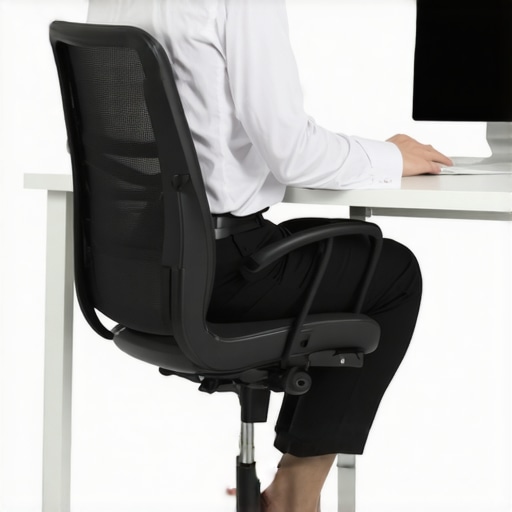
Adjust the seat height so your feet are flat on the ground and your knees are roughly level with your hips. Then, set the lumbar support so that it fills the hollow of your lower back comfortably—neither too high nor too low. Use the adjustable knobs or sliders, or add supportive accessories if your chair lacks flexibility. Once properly positioned, stay conscious of maintaining this posture during work. During my setup, I used a mirror to check my back orientation, ensuring the support was in the right place.
Practice Active Posture Maintenance Throughout the Day
Regularly check your seating position, especially during long periods of work. Consider setting reminders to readjust your lumbar support if it shifts. Incorporate short breaks to stand and stretch your back muscles, preventing stiffness. I kept a sticky note on my desk reminding me to ‘sit tall’ and ensure my lumbar area remained supported—this small step made a noticeable difference over time.
Enhance Support with Additional Accessories if Needed
If your chair’s built-in support isn’t sufficient, try ergonomic cushions designed specifically for lumbar support. These can be easily swapped between chairs and offer adjustable firmness. For high-end comfort, some support cushions feature gel or memory foam to better conform to your back’s shape. During a period of extended remote work, I added a gel lumbar pillow, which significantly reduced my back pain. You can explore options like the top lumbar support chairs for integrated solutions or pair your existing chair with supportive accessories.
Evaluate and Iterate Your Setup
After implementing these adjustments, spend a few days monitoring your comfort levels. Are you experiencing less discomfort? Do you find your posture more natural? If not, fine-tune your lumbar height or consider replacing worn-out support accessories. Remember, proper lumbar support is a dynamic element—what works now might need adjustment later. I visited to consult ergonomic experts when my back pain persisted despite repeated setup changes. Listening to your body and iterating on your support approach is essential for sustained comfort.
Many assume that simply choosing a mesh or ergonomic chair guarantees perfect back health, but the reality is far more nuanced. A common misconception is that all lumbar supports are equally effective; however, the truth is that the impact of support design varies significantly based on your unique spinal curvature and sitting habits. For example, some mesh chairs boast adjustable lumbar support, but if the support isn’t customizable enough or doesn’t align precisely with your lumbar curve, it can do more harm than good. This is where many fall into a trap, believing that adjustable features automatically mean better support, but the quality and positioning matter just as much as adjustability. Moreover, a widespread myth is that thicker cushions or more prominent support are better—yet, overly bulky support can restrict movement and impede natural spinal motion, leading to stiffness over time. An advanced mistake some overlook is neglecting dynamic support systems, which adapt to your movements rather than remaining static; studies by ergonomics experts emphasize that dynamic lumbar support can significantly improve long-term comfort and posture by accommodating shifting positions throughout the day.
Are Adjustable Lumbar Supports Always Better for Your Posture?
Contrary to popular belief, more adjustability isn’t necessarily synonymous with better support. If the support cannot be precisely aligned with your spine or is too rigid, it might cause pressure points or promote poor posture. Selecting a chair with a well-designed lumbar support that matches your specific lumbar lordosis— the natural inward curve of the lower back—is crucial. To delve deeper into optimal lumbar solutions, explore our guide on lumbar support in office chairs. Additionally, many users purchase the latest ergonomic models but end up neglecting proper adjustments—resulting in suboptimal support. Regularly reviewing and customizing your chair setup ensures that your lumbar support complements your sitting habits rather than conflicts with them. Remember, ergonomic support isn’t about fancy features; it’s about precise, personalized support that respects your unique spinal structure. Don’t fall for the trap of one-size-fits-all solutions—invest time in customizing your setup or consult an ergonomic professional. If you’re unsure whether your current office seating promotes healthy posture, check out our comparison of mesh versus traditional chairs to understand which option might better serve your ergonomic needs. Have you ever fallen into this trap? Let me know in the comments.Maintaining a proper ergonomic setup isn’t a one-time effort; it requires consistent attention and the right tools to keep your workspace in optimal condition. Personally, I rely on a few specific accessories and routines that have drastically improved my longevity with my office furniture, especially my mesh chair and lumbar support systems. One essential item I swear by is a high-quality microfiber cloth paired with a gentle cleaning solution. Regularly wiping down your chair’s surfaces, including the mesh fabric, prevents dust and grime buildup that can compromise comfort and longevity. To make this easier, I use a flexible, telescopic duster that reaches into tight spots, ensuring every part stays clean without dismantling your setup.
How do I maintain my ergonomic setup over time?
Another tool I’ve found indispensable is a dedicated chair maintenance kit, which includes small screwdrivers, lubricant sprays, and replacement parts. Over months of use, screws can loosen, and moving parts like adjustment levers can become stiff. Having these tools at hand allows me to address issues promptly, avoiding costly repairs or the need for a new chair prematurely. For example, lubricating the tilt mechanism every six months keeps it smooth and responsive. I particularly trust silicone-based lubricants recommended by ergonomic experts, such as those detailed in the ultimate guide to ergonomic chairs. Regular check-ins are crucial—set a reminder monthly to evaluate your seating’s comfort and support features. Adjustments might be necessary as your body changes or if you notice new discomfort. For instance, I once noticed my lumbar support had shifted and simply re-loosened a few screws, restoring proper support without replacing the entire chair.
What tools can help scale comfort for long-term use?
Upgrading accessories can make a noticeable difference; an adjustable lumbar cushion with a memory foam core, for example, can be customized to your evolving needs. I recommend trying a gel-based lumbar support for added cooling and conforming features that adapt to your back shape over time. Additionally, investing in a monitor arm with navigation-friendly features helps you maintain proper posture and reduce strain during extended work sessions. As the trend moves towards smarter workspace management, integrating tools like posture tracking apps—such as Ergonomics+—can offer real-time feedback and recommendations, ensuring your setup remains effective as your work habits evolve. Keep in mind that the key to long-term success is routine maintenance paired with these versatile tools.
Looking ahead, what’s the future of office maintenance?
Experts predict that automated, IoT-enabled ergonomic systems will soon monitor and alert users about necessary adjustments or wear and tear, simplifying upkeep. Imagine a smart chair that detects loosened screws or compressed cushions and orders replacement parts automatically, reducing downtime and extending your furniture’s lifespan. Staying ahead involves implementing small, proactive habits now, such as regularly inspecting your ergonomic features and adapting with the latest supportive accessories. Remember, a well-maintained workspace not only boosts your health but also enhances your productivity in the long run. If you’re ready to elevate your setup, start by acquiring a precision tool kit to keep everything tight and responsive. A small step like this can prevent many issues before they become costly or painful, ensuring your office remains a sanctuary of productivity and health.
What I Wish I Knew Before Investing in Office Seating
One of the most impactful lessons I learned was that not all lumbar supports are created equal—some are designed more for aesthetic appeal than genuine comfort. I realized that selecting an ergonomic chair is only part of the equation; understanding how to fine-tune its support features can make a world of difference. It’s tempting to rely solely on adjustable dials, but I discovered that truly customizing support requires patience and a willingness to experiment until the support aligns perfectly with my natural spine curvature.
Tools That Changed How I Maintain My Workspace
Over the years, I’ve found that small, dedicated tools can dramatically extend the lifespan and comfort of my ergonomic setup. A quality microfiber cloth and silicone lubricant have become essentials for me, ensuring that my chair remains clean, smooth, and supportive. Investing in replacement parts like adjustment levers or caster wheels, which I store in a compact maintenance kit, has saved me from unnecessary chair replacements and kept my posture pristine. Finding these trusty tools was a game-changer in my ergonomic journey, aligning with the idea that proactive care pays off.
Embracing the Evolution of Ergonomic Benefits
Looking ahead, I’m excited about the future of office ergonomics—particularly how smart, IoT-enabled chairs will offer real-time feedback and automatic adjustments. Imagine a chair that detects when your lumbar support needs repositioning or when it’s time for maintenance, alerting you before discomfort arises. This technological evolution underscores an important truth: ergonomic support isn’t a set-and-forget deal; it’s a dynamic process that benefits from innovation and ongoing attention. Taking action today—by exploring our ultimate guide to ergonomic chairs—helps ensure that your workspace remains a haven of health and productivity.
![4 Lumbar Support Fixes That End Lower Back Stiffness [2026]](https://chairs.techdeskessentials.com/wp-content/uploads/2026/03/4-Lumbar-Support-Fixes-That-End-Lower-Back-Stiffness-2026.jpeg)
Reading this reminded me how easy it is to overlook the importance of proper lumbar support until back pain strikes. I used to think that just sitting upright was enough, but after some persistent discomfort, I realized that the support system in my chair was far from ideal. Since upgrading to a chair with adjustable lumbar support, my posture has noticeably improved, and my fatigue has decreased during long work sessions. One thing that helped me was experimenting with different support positions, which is crucial because everyone’s spine is different. I wonder, how do others find the best positioning for their lumbar support? Do you prefer fixed or dynamic lumbar systems that adjust as you move? It’s a game-changer for long-term comfort and productivity, especially for those working remotely, but it definitely requires some trial and error.