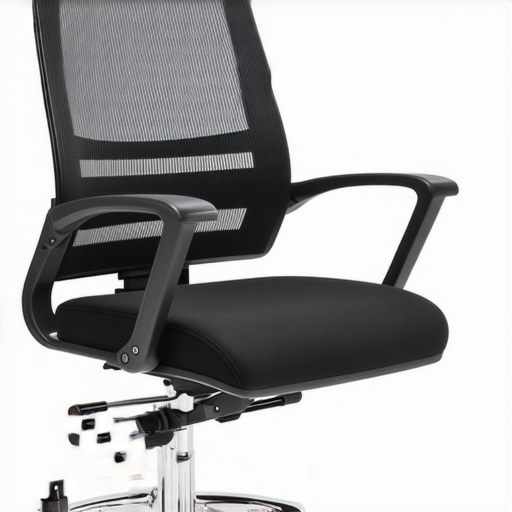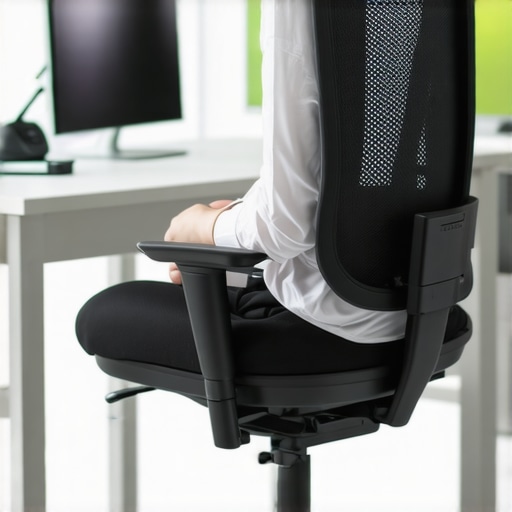
I remember the exact moment I realized my old office chair was killing my back. It was a typical Monday, and I was hunched over my desk, feeling that dull ache settle into my lower back. I had ignored the warning signs for too long—sore shoulders, stiff neck, and a constant need to stretch. That lightbulb moment hit me hard: I needed a chair that supported me, not one that just looked good. Since then, I’ve made it my mission to find the best ergonomic mesh office chairs that offer long-lasting support, especially for those of us who spend hours at our desks.
Why Your Chair Choice Matters More Than Ever
We’re living in a time when remote work and long hours at the desk have become the norm. According to a study published by the Mayo Clinic, poor posture can lead to chronic back pain, decreased productivity, and even mental fatigue. A good chair isn’t just a luxury; it’s essential for your health and efficiency. But here’s the kicker: many people settle for cheap or traditional chairs that don’t offer the right support, leading to issues that could have been easily prevented. Trust me, I’ve made that mistake early on—buying what seemed like a good deal but ended up costing me more in discomfort and doctor visits.
Is a Mesh Office Chair Actually Worth the Hype?
This is where many of us hesitate. Mesh chairs are praised for their breathability and modern look, but do they really deliver the support needed for long hours? I was skeptical at first, too. My initial mistake was choosing a mesh chair based solely on style, ignoring the lumbar support. That’s why I recommend doing your homework before making a purchase. For a detailed guide on what to look for, check out this expert guide. It helped me avoid common pitfalls and find a chair that truly supports my posture.
So, if you’ve ever felt that nagging pain after a long day of work or wondered if your chair could be doing more for your back, you’re not alone. Today, we’re diving into how to select the best ergonomic mesh office chair that will keep you comfortable and healthy, no matter how many hours you spend sitting. Ready to find your perfect match? Let’s get started.
Adjust Your Seat Height Precisely
Start by setting your chair height so that your feet are flat on the floor and your knees form a 90-degree angle. I remember my first attempt; I struggled to get it right, and it caused discomfort that lasted days. Using a tape measure or the height adjustment lever, I fine-tuned until my thighs were parallel to the ground, which immediately improved my posture and reduced strain on my lower back.
Engage the Lumbar Support Correctly
Next, focus on lumbar support. Most ergonomic mesh chairs have a lumbar adjustment feature. I recommend sitting in the chair and moving the lumbar support until it fits snugly into your lower back’s natural curve. When I did this, I felt a noticeable difference—less slouching and more sustained comfort. For detailed tips on optimizing lumbar support, visit this guide.
Fine-Tune Seat Depth and Forward Tilt
Adjust the seat depth so that there’s about a two-finger gap between the edge of the seat and the back of your knees. I initially ignored this and felt pressure behind my knees, leading to numbness. Moving the seat forward a bit relieved that pressure, and I could sit comfortably for longer periods. Additionally, many chairs offer a tilt mechanism—set it to a slight recline to distribute your weight evenly and reduce lower back fatigue.
Optimize Armrest Height and Width
Ensure your armrests are at a height where your shoulders are relaxed and elbows are close to your body at a 90-degree angle. I once used armrests set too high, which elevated my shoulders and caused neck tension. Lowering them to the right height helped me keep my arms supported without strain. Proper armrest positioning can prevent shoulder and neck pain, especially during long work sessions.
Maintain Proper Posture with Regular Adjustments
Even after setting everything correctly, check your posture periodically. Sit back fully in the chair, keep your feet flat, and ensure your lower back is supported. I developed a habit of adjusting my position every 30 minutes, which kept discomfort at bay. Remember, an ergonomic chair isn’t a set-it-and-forget-it tool; it requires ongoing fine-tuning to sustain support over time.
Test and Confirm Comfort Before Buying
Before making a final decision, spend at least 15 minutes testing the chair in different positions. I did this at a local store, adjusting every feature and noting how I felt after sitting for a few minutes in each setup. This hands-on approach prevented me from buying a chair that looked good but didn’t support my posture effectively. For more insights, check out this expert guide.
Many people believe that choosing an ergonomic mesh office chair is a straightforward decision: pick the most breathable, stylish, or cheapest option, and you’re set. However, this oversimplification masks some critical nuances that can significantly impact your comfort and health. Let’s dig deeper into what most folks get wrong and how to avoid costly mistakes.
Why the Popularity of Mesh Chairs Can Be Misleading
One widespread misconception is that all mesh chairs automatically provide superior support because of their breathable fabric. While mesh does enhance airflow, support quality depends on the design, materials, and adjustability features. For example, a mesh chair with a flimsy frame or poorly designed lumbar support can cause more harm than good, especially during long hours. According to a comprehensive review, not all mesh chairs are created equal. You need to look beyond the surface and evaluate the structure and adjustability.
Beware of the ‘Set It and Forget It’ Trap
Many users assume that once they’ve set their ergonomic chair correctly, no further adjustments are necessary. This is a dangerous myth. Our bodies are constantly shifting, and so should your posture. Regular fine-tuning of seat height, lumbar support, and tilt angles is essential. Failure to do this can lead to sustained improper posture, resulting in chronic pain. I recommend periodically re-evaluating your setup, especially after long work sessions, to ensure ongoing support. For detailed tips, see this guide.
Advanced Question: How Do I Know if My Support Is Truly Effective?
Great question. The key is to assess not just comfort but also the alignment of your posture over time. An ergonomic chair should promote a neutral spine, reduce muscle strain, and allow for movement. If you find yourself slouching despite proper adjustments, or if you experience persistent discomfort, it indicates that your support system isn’t effective. Incorporating ergonomic accessories like lumbar cushions or seat wedges can help refine support further. Remember, what works for one person may not work for another. For personalized advice, consider reaching out to experts via our contact page.
In summary, choosing the right ergonomic mesh office chair involves more than just selecting a trendy design or the most breathable fabric. It requires understanding the support features, committing to regular adjustments, and being attentive to your body’s signals. Don’t fall into the trap of oversimplification—your back will thank you. Have you ever fallen into this trap? Let me know in the comments!
Keeping your ergonomic office setup in top shape over time requires more than just initial adjustments; it involves using the right tools, routines, and expert strategies to ensure sustained comfort and support. In my experience, investing in specific equipment and software can dramatically extend the lifespan of your ergonomic investments and prevent common issues like back pain or postural fatigue.
Invest in Quality Maintenance Tools
One of my favorite tools is a simple adjustable wrench combined with a set of Allen keys. I use these regularly to fine-tune my chair’s lumbar support and armrest tension, especially after cleaning or if I notice any looseness. Over time, constant use causes mechanical components to loosen, which can compromise support. Regular tightening prevents this issue and keeps your chair functioning as intended. Additionally, a small silicone lubricant spray can keep moving parts like tilt mechanisms and height adjusters smooth and responsive. Applying this every few months ensures your chair maintains effortless adjustability, minimizing wear and tear.
Use Software to Remind You of Adjustments
Beyond physical tools, I rely on simple digital reminders. Setting calendar alerts or using productivity apps like Todoist helps me remember to evaluate and adjust my posture every 30 to 60 minutes. These prompts are crucial because even the best chair cannot compensate for poor habits. Consistently revisiting your setup ensures that lumbar support, seat height, and armrest positions stay optimal, especially during long working days. For example, I use a desktop app that pings me at regular intervals, guiding me through quick posture checks and adjustments.
Prioritize Long-Term Support with Upgrades
As your needs evolve, so should your ergonomic equipment. I recommend periodically upgrading key components like lumbar cushions or seat pads, which can significantly improve comfort and prolong the life of your original chair. For instance, adding a lumbar cushion can provide extra support and reduce strain, especially if your chair’s built-in lumbar support starts to wear out. These small upgrades extend the usability of your setup and adapt to your changing posture needs.
Predict Future Trends in Office Support
Looking ahead, I believe the integration of smart technology will revolutionize ergonomic support. Chairs equipped with sensors that monitor posture and automatically adjust support levels are on the horizon. This innovation will further personalize long-term support, making maintenance even more effortless. Companies are already testing AI-driven systems that learn your preferred sitting positions and suggest ergonomic improvements in real-time.
How do I maintain my ergonomic support over time?
The key is to establish routine check-ins using both physical tools and digital reminders. Regularly tightening components, upgrading accessories, and leveraging emerging smart tech will ensure your setup remains supportive and comfortable. Don’t forget to consult expert resources like this comprehensive guide for ongoing advice. I encourage you to try one of these advanced tools today—perhaps a simple reminder app—to start maintaining your ergonomic setup proactively. Your back will thank you for it!
Throughout my journey to find the perfect office setup, I’ve learned that the real secret lies in understanding the subtle nuances of ergonomic support. One of the most valuable lessons I discovered is that even the best chair requires ongoing attention and adjustments. Small tweaks, like repositioning lumbar support or fine-tuning armrests, can make a world of difference in preventing discomfort and ensuring sustained productivity. My personal lightbulb moment was realizing that ergonomic mastery isn’t a one-time fix but a continuous process of listening to my body and responding proactively.
My Essential Toolkit for Maintaining Comfort
Investing in quality tools like an adjustable wrench and Allen keys has been a game-changer. These allow me to tighten loose components and keep my chair functioning smoothly, prolonging its support capabilities. Additionally, I rely on ergonomic accessories such as lumbar cushions, which I trust because they adapt to my evolving posture needs and provide extra relief when my built-in support wears out. These simple upgrades and tools keep my setup reliable and comfortable over the long haul, preventing issues before they start.
What I Wish I Knew Sooner
One insight I wish I had embraced earlier is the importance of digital reminders. Setting periodic alerts on my phone or desktop helps me remember to adjust my posture and verify that my support features are still optimized. This proactive habit has significantly reduced muscle strain and back pain. Plus, I’ve started using smart tech features in newer chairs that monitor posture and automatically make adjustments—an exciting innovation that I believe will become standard in ergonomic office furniture soon. Staying vigilant and proactive has been crucial for my back health and comfort.
Keep Moving Forward with Confidence
The future of ergonomic support is bright, with new technologies making it easier than ever to maintain perfect posture. Whether you’re using simple reminders or exploring smart chairs with sensors, taking action today can drastically improve your long-term comfort. Remember, your ergonomic journey is personal—what works for me might need slight adjustments for you. I encourage you to experiment, stay curious, and prioritize your well-being each day. Your back will thank you for the effort and mindfulness you invest now.
Have you ever struggled with maintaining your ergonomic setup over time? Share your experiences below—I’d love to hear what’s worked or what challenges you’ve faced!