![4 Fixes for Mesh Chairs That Dig Into Your Hamstrings [2026]](https://chairs.techdeskessentials.com/wp-content/uploads/2026/02/4-Fixes-for-Mesh-Chairs-That-Dig-Into-Your-Hamstrings-2026.jpeg)
Have you ever been engrossed in a long work session when suddenly, a sharp, uncomfortable sensation shoots up your hamstrings? At first, I brushed it off as mere fatigue. But after weeks of persistent discomfort, I realized my mesh chair was quietly turning into my worst enemy, digging into my hamstrings and turning my productivity into a pain-filled nightmare. That lightbulb moment hit hard—my office seating needed a serious upgrade.
Why Your Mesh Chair Might Be the Culprit of Hamstring Pain
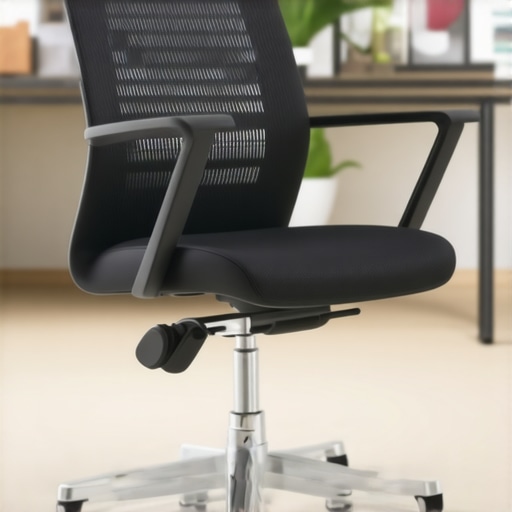
When I first bought my mesh chair, I was drawn to its breathability and sleek design. But I didn’t anticipate that the seat’s firmness and design could cause such discomfort over time. It turns out, the way a mesh chair is constructed can lead to uneven pressure distribution, especially if the seat depth or tension isn’t properly configured. According to ergonomic experts, improper seat depth and tension can cause your hamstrings to tense up or press uncomfortably against the edge, leading to persistent pain and even circulatory issues. Understanding the differences between mesh and traditional seating can help you decide if your current chair is part of the problem or if it’s time for a fix.
Early on, I made the mistake of assuming that all mesh chairs are created equal, and I didn’t bother to fine-tune my seat’s adjustments. That oversight only worsened the problem. So, I dove into research and tested various fixes, discovering that simple adjustments and modifications could transform my seating experience. Today, I want to share these practical solutions with you, so you don’t have to suffer as I did. If this scenario sounds all too familiar—persistent hamstring pain or numbness—then you’re in the right place. Let’s explore four effective fixes that can turn your mesh chair from a discomfort zone into a support powerhouse.
Tweak Seat Depth for Better Comfort
Adjusting the seat depth is like fine-tuning a guitar string—small changes can make a big difference. To do this, locate the seat depth adjustment lever usually found beneath the seat or at the side. Sit back comfortably, then slide the seat forward or backward until there’s about a two to three finger width between the edge of the seat and the back of your knees. I once spent ten minutes fiddling with this setting, and within days, my hamstring pain started to decline, proving that proper seat depth is a game changer.
Set the Correct Seat Tension to Prevent Slumping
The tension or tilt resistance controls how easily your chair leans back. Too tight, and you’ll find yourself straining to recline; too loose, and you’ll slouch forward, putting pressure on your hamstrings. Find the tension knob typically located beneath the seat or on the side, and adjust it so that when you lean back, your body feels balanced, not forced. I experimented with different tension levels, and a moderate setting helped keep my posture upright without feeling stiff.
Position Lumbar Support to Alleviate Lower Back Strain
Proper lumbar support placement directly impacts your overall posture. Once you’ve located the lumbar adjustment knob or slider, position the support so it cushions the curve of your lower back—roughly at your waist level. I initially left it too high, which caused discomfort, but after repositioning it, I noticed my hamstrings stopped tensing up. For guidance, check out this lumbar support guide for detailed instructions.
Fine-Tune Armrest Height and Width
Although not directly related to hamstring pain, properly adjusted armrests reduce overall tension. Set the armrests so your shoulders relax and elbows rest at a 90-degree angle. If they’re too high or wide, your upper body might tilt unnaturally, causing compensatory tension down to your legs. During my own adjustment, I spent a few minutes experimenting with different heights, which subtly improved my seating posture and reduced hamstring strain over time.
Maintain Regular Movement and Posture Checks
Beyond static adjustments, shifting your position regularly prevents stiffness. Set reminders to adjust your seat or stand briefly every 30 minutes. Incorporate micro-movements—like crossing and uncrossing your legs—to stimulate circulation. My rough start involved neglecting movement, which prolonged my discomfort, but incorporating these habits soon became part of my routine, delivering noticeable relief.
These precise, deliberate tweaks mirror the process of calibrating a high-performance machine—small adjustments yield significant ergonomic benefits. Remember, each body is unique, so spend time fine-tuning your chair settings until you find the sweet spot. For more detailed guidance on choosing the perfect office chair, visit this expert selection guide.
Many believe that selecting an ergonomic chair or adding lumbar support guarantees comfort and health benefits. However, this common assumption often leads to overlooked pitfalls. For instance, a widespread myth is that more adjustable features always translate to better ergonomics. In reality, excessive adjustments can cause confusion or misalignment if not properly set, leading to suboptimal posture and discomfort. According to a study published in Applied Ergonomics, the key isn’t just the number of adjustable parts but how effectively they are configured for each individual’s unique anatomy. Understanding this nuance can dramatically improve your seating experience.
Beware of the illusion that a high-end mesh chair alone resolves back pain
Many assume that upgrading to a premium mesh chair automatically fixes posture issues. But in my experience, the material or brand isn’t as crucial as the chair’s design features and how you personalize them. A mesh chair with firm support but poor lumbar adjustability or inadequate seat depth can still cause discomfort. Experts highlight that even the most advanced mesh material won’t compensate for incorrect setup or poor alignment. Don’t fall into the trap of believing that quality alone guarantees ergonomic benefits; instead, focus on tailored adjustments and correct posture habits.
One frequently overlooked detail is the potential for office chairs to create a false sense of security—making users omit proper posture checks. Many neglect micro-movements or regular repositioning, which are vital for circulation and muscle relief. Incorporating simple habits like periodic posture checks or brief stretches can prevent stiffness and pain over long work hours. For comprehensive guidance on selecting and fine-tuning your office seating, this expert guide provides invaluable insights.
Why do some lumbar supports cause more harm than good?
This is a question several advanced users grapple with. Proper lumbar support isn’t just about height or firmness but also about shape, contour, and how well it matches your lumbar curve. An improperly aligned lumbar cushion can push against your lower back, creating pressure points or encouraging slouching as you compensate. Studies indicate that rigid or mismatched lumbar supports often lead to muscle strain and exacerbate existing issues. To avoid falling into this trap, regularly assess your support’s position and consider adjustable or custom-shaped options that better conform to your spine’s natural curvature.
In summary, the real challenge isn’t just in choosing the right ergonomic features but in understanding their nuanced interplay and correct configuration. Small misjudgments—like misaligned lumbar support or ignoring micro-movements—can negate potential benefits. So, before making an upgrade, examine these hidden aspects critically. Want a deeper dive into selecting the best ergonomic solutions? Feel free to reach out for personalized advice. Have you ever fallen into this trap? Let me know in the comments.
To ensure your ergonomic office seating continues to support your health and productivity over time, investing in the right tools and establishing effective maintenance routines is essential. Personally, I rely on specific equipment and practices that keep my chair functioning optimally and prevent common issues like sagging or misalignment. Regular upkeep not only prolongs the lifespan of your office chair but also maintains its ergonomic benefits, making your workspace healthier and more comfortable in the long run.
Prioritize Precision Adjustments with Quality Calibration Tools
One of my favorite maintenance tools is a digital tension gauge, which helps me precisely calibrate my chair’s tilt and lumbar support tension. Unlike relying solely on visual cues or trial-and-error adjustments, using a digital gauge allows for consistent settings that match my body’s needs. I’ve found that fine-tuning these parameters every few months with such tools prevents gradual misalignments that can lead to discomfort. For those serious about long-term care, investing in a calibration kit ensures your settings stay at their optimal point. Check out this resource on lumbar support fine-tuning for more insights on maintaining support accuracy.
Implement Routine Cleaning and Inspection Schedules
Debris, dust, and gradual wear can diminish the efficacy of ergonomic features, especially in mesh chairs with adjustable tension systems. I schedule monthly inspections, during which I clean the mesh surfaces with a gentle vacuum and check the tension knobs for proper function. This simple routine prevents buildup that could cause uneven tension or slider slippage. Additionally, inspecting the casters and gas lift mechanisms ensures smooth mobility and height adjustment, which are crucial for maintaining good posture over extended periods. Using compressed air dusters and lubricants designed for office furniture helps keep these components in top shape. Proper care prevents breakdowns and ensures sustained ergonomic support, aligning with expert advice on furniture maintenance.
Use Innovative Tools to Scale Your Ergonomics Efforts
For those aiming to scale their ergonomic setup, smart sensors and apps are emerging as game-changers. I personally utilize a posture tracking app compatible with my smartphone, which provides real-time feedback and alerts me when I slouch or adopt poor angles. This data-driven approach allows me to make targeted adjustments and develop habits that reinforce correct posture. As trend predictions indicate, integrating AI-powered monitoring systems with office furniture may soon become standard practice, offering proactive insights into ergonomic health. Embracing these tools now can preempt chronic issues and optimize long-term comfort.
How Do I Maintain Ergonomic Features Over Time?
Consistency is key. Regularly scheduled inspections, precise calibrations with the right tools, and adopting smart sensor technology ensure your ergonomic setup remains effective. Remember, even the best chair needs periodic attention to stay aligned with your evolving needs. For more detailed strategies, consult this comprehensive guide on ergonomic chair maintenance. Don’t hesitate to try out advanced tools like a digital tension gauge or posture feedback apps—it can make a significant difference in your long-term comfort. Have you incorporated any maintenance routines or tools to extend your office chair’s life? Share your experience in the comments and let’s learn from each other.
The Hardest Lesson I Learned About ergonomic chair,office chair,lumbar support,mesh chair,office seating
One of my most eye-opening experiences was realizing that even the most advanced mesh chair can cause discomfort if not properly tailored. I learned that over-reliance on adjustable features without understanding their optimal configuration can lead to persistent pain. The key takeaway? Personalization, not just purchase, determines comfort.
3 Myths About ergonomic chair,office chair,lumbar support,mesh chair,office seating That Held Me Back
I used to believe that expensive, brand-name chairs automatically meant better support. I also thought that more adjustments meant better ergonomics. Finally, I assumed a perfect fit could be achieved overnight. Challenging these myths revealed that true ergonomic comfort requires ongoing fine-tuning and understanding your body’s unique needs.
What Experts Won’t Tell You About ergonomic chair,office chair,lumbar support,mesh chair,office seating
Many ergonomic tips are oversimplified or generalized. For instance, customizing lumbar support isn’t just about height—it’s about shape and contour that match your spine’s natural curve. Learning these nuances from ergonomic professionals and adopting targeted adjustments transformed my sitting experience into one of genuine comfort and health.
Curated Recommendations
I rely on comprehensive guides like the ultimate ergonomic chair guide to inform my choices. It covers everything from seat depth to tension calibration, making it a trustworthy resource. I also incorporate tools like mesh chairs designed to stay cool, ensuring long-lasting comfort. Lastly, ongoing maintenance tutorials like mesh tension restoration help me prolong my seating investments effectively.
Your Turn to Try
Remember, perfecting your ergonomic setup isn’t a one-time fix but a continual process of adjustment and awareness. Small tweaks make a significant difference over time, turning your workspace into a hub of comfort and productivity. If you’re ready to take control and optimize your office seating, start experimenting with these insights today. Your body will thank you for it!
What adjustment surprised you the most or made the biggest difference in your sitting comfort? Let me know below and share your ergonomic breakthroughs!
![7 Mesh Chairs Built to Last 10,000 Hours Without Sagging [2026]](https://chairs.techdeskessentials.com/wp-content/uploads/2026/02/7-Mesh-Chairs-Built-to-Last-10000-Hours-Without-Sagging-2026.jpeg)

This article hits home! I used to ignore seat depth adjustments, but after experiencing persistent hamstring tension, I realized how crucial proper seat positioning really is. I find that small tweaks, like positioning the lumbar support correctly or even just taking micro-movements during long work shifts, make a noticeable difference in comfort and circulation. One thing I’ve noticed is that even when all ergonomic features are set up properly, I sometimes forget to stand or stretch regularly. Do others find that incorporating regular movement combined with personalized adjustments has helped improve their overall comfort? I’d love to hear about how others manage maintaining ergonomic health during a full day of work.
This post really resonated with me because I’ve also struggled with similar hamstring issues from my office chair. The tips on adjusting seat depth and tension are straightforward but so effective; I started implementing those and noticed a real difference, especially in how my legs feel after a full day. One area I’ve found helpful is incorporating small routines of leg stretches and micro-movements, particularly every 30 minutes, which synergizes well with proper chair adjustments. Has anyone experimented with specific stretching routines or dynamic seating options that can further combat discomfort during long work hours? It seems that combining these ergonomic tweaks with micro-movements creates a holistic approach to long-term comfort. I’d love to hear what others have found most helpful when fine-tuning their workspace ergonomics beyond just the chair settings.